bukosabino/ta
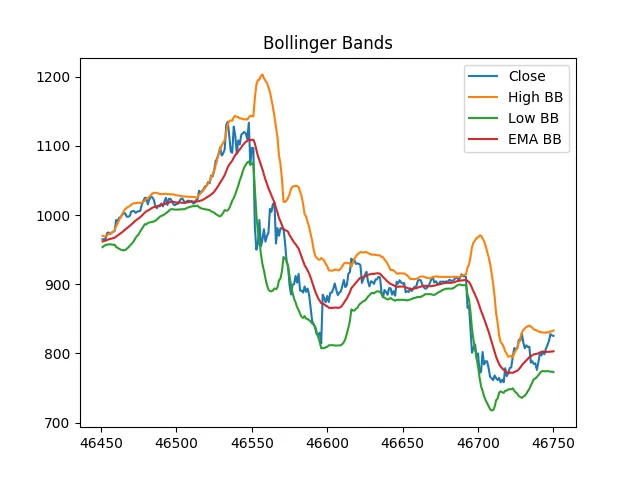
 A plot from the README: a closing price with the upper, lower and middle Bollinger Bands the library computes. Image from the repository's README. Copyright 2020 Darío López Padial (Bukosabino). Licence: MIT. Source file on GitHub, copied and resized. How images are chosen.
In its own words: Technical Analysis Library using Pandas and Numpy
Risk warning: CFDs and spread bets are complex instruments and come with a high risk of losing money rapidly due to leverage. You can lose money on these products, and each provider publishes its own loss figure under FCA rules. You should consider whether you understand how they work and whether you can afford to take the high risk of losing your money. Automated and API trading can amplify losses through bugs, connectivity failures and runaway orders.
The facts
- Stars
- 5,233
- Forks
- 1,160
- Language
- Jupyter Notebook
- Licence
- MIT
- Created
- Last push
- Kind
- Data, indicators and charts
- Read from GitHub
- github.com/bukosabino/tachecked
Stars measure attention, not quality or safety. Nothing here reviews the code or its author. Read the licence, the open issues and the code itself before you run anything against an account. Star velocity: unmeasurable, because this site holds one reading for this repository.
Get started in a couple of minutes
You need Python, Git and Jupyter installed. Then, in a terminal:
git clone https://github.com/bukosabino/ta.git
cd ta
- python -m venv .venv, then activate it
- pip install notebook, plus anything the README lists
- jupyter notebook, then open a notebook from the list
These are the usual steps for a project in this language, not instructions taken from this repository. Its README has the exact commands, and it wins wherever the two differ.
Before you connect anything to a broker: read what the code does, use a demo account, and keep keys in environment variables, never in the code. New to GitHub? Start with the basics.